
Using Paasa
How to Transfer RSUs from Equateplus to Paasa
A guide to transferring your vested RSUs from Equateplus to Paasa without selling them first.

Abhighyan Sinha

If your RSUs are held with Equateplus, you can transfer your vested shares directly to your Paasa global investment account without selling them first irrespective of where they are listed (US, EU, etc.) and the currency they are denominated in (USD, GBP, etc.).
Once the transfer is done, you can manage your stocks directly through Paasa and sell them whenever you want to.
You can then use the sale proceeds to buy stocks and ETFs listed in markets across 11 countries, including the United States, United Kingdom, Switzerland, Hong Kong, Germany, France, Canada, Netherlands, Japan, and Singapore.
Paasa also allows you to withdraw the sale proceeds to any bank account in the world (as long as the account is in your name).
This allows you to diversify beyond your employer stock and invest across global markets, directly from your RSU earnings.
If you have left your employer and EquatePlus has given you a deadline to sell, read what to do when EquatePlus is forcing you to sell your RSUs first. For how RSU transfers work in general, see whether you can transfer your RSUs to another broker.
Step 1: Create your Paasa account
If you haven't already, download the Paasa app and complete your KYC to open your global investing account.

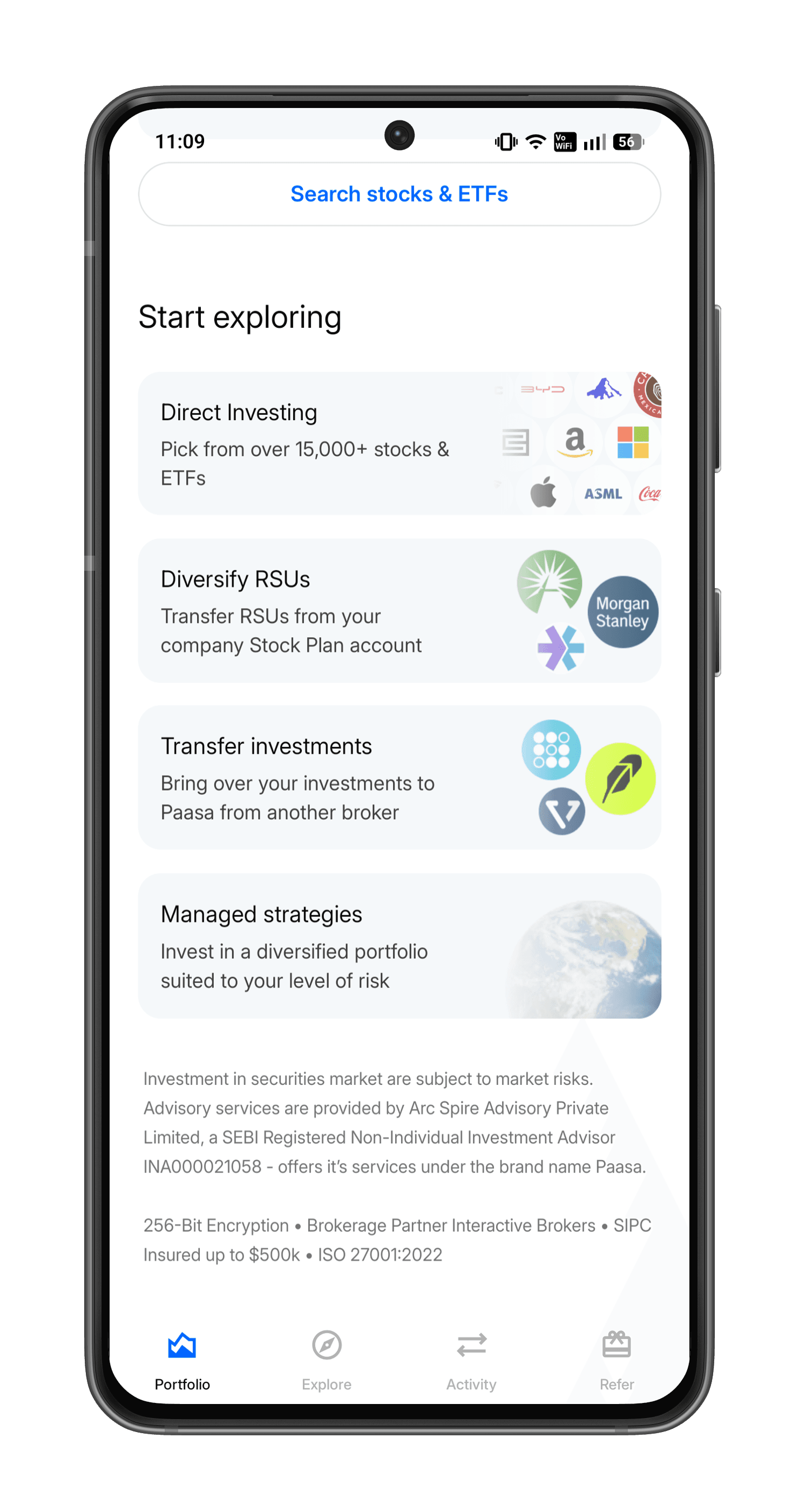
Step 2: Open the Paasa app and tap "Transfer investments"
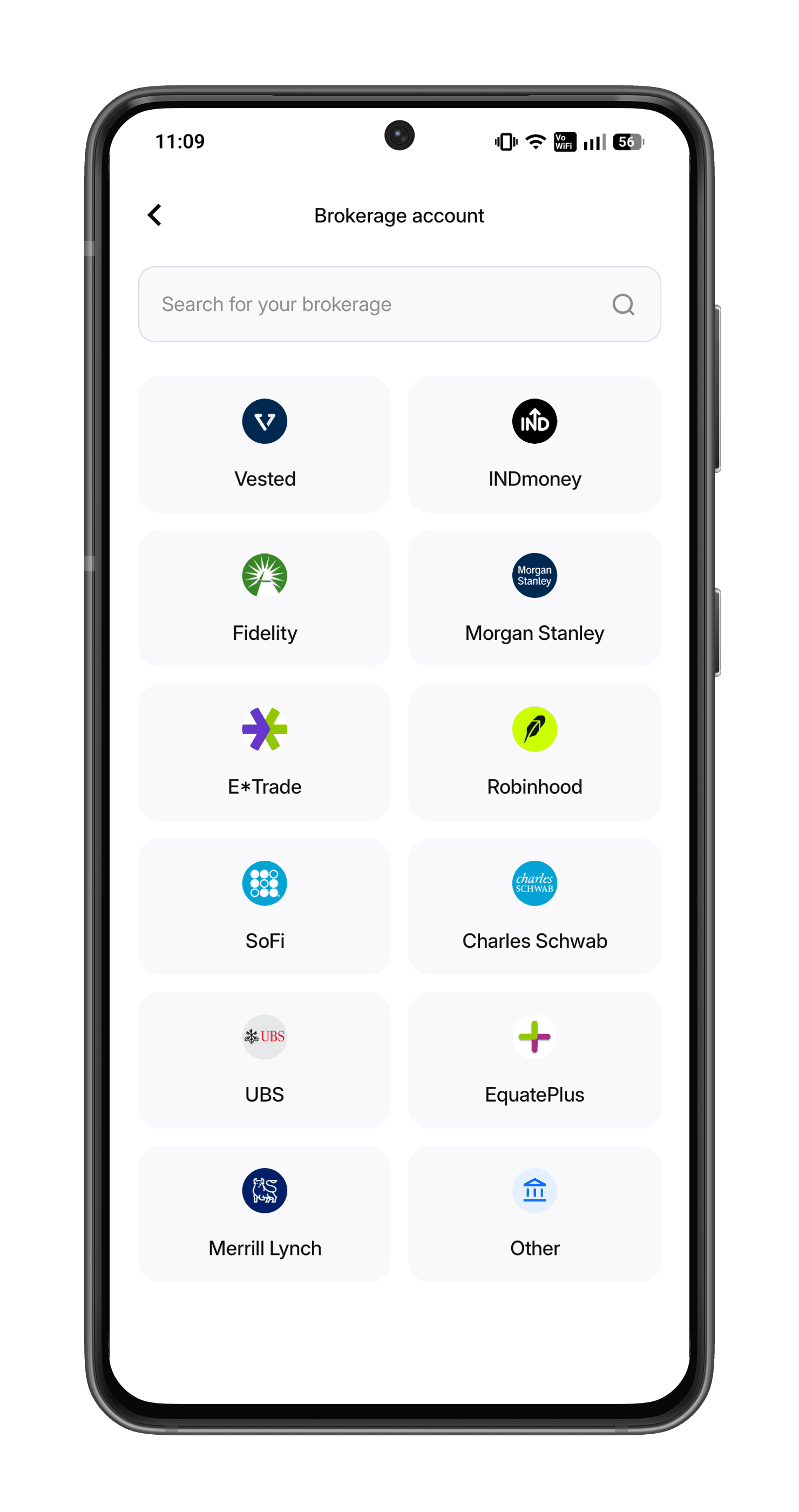
Step 3: Select your broker
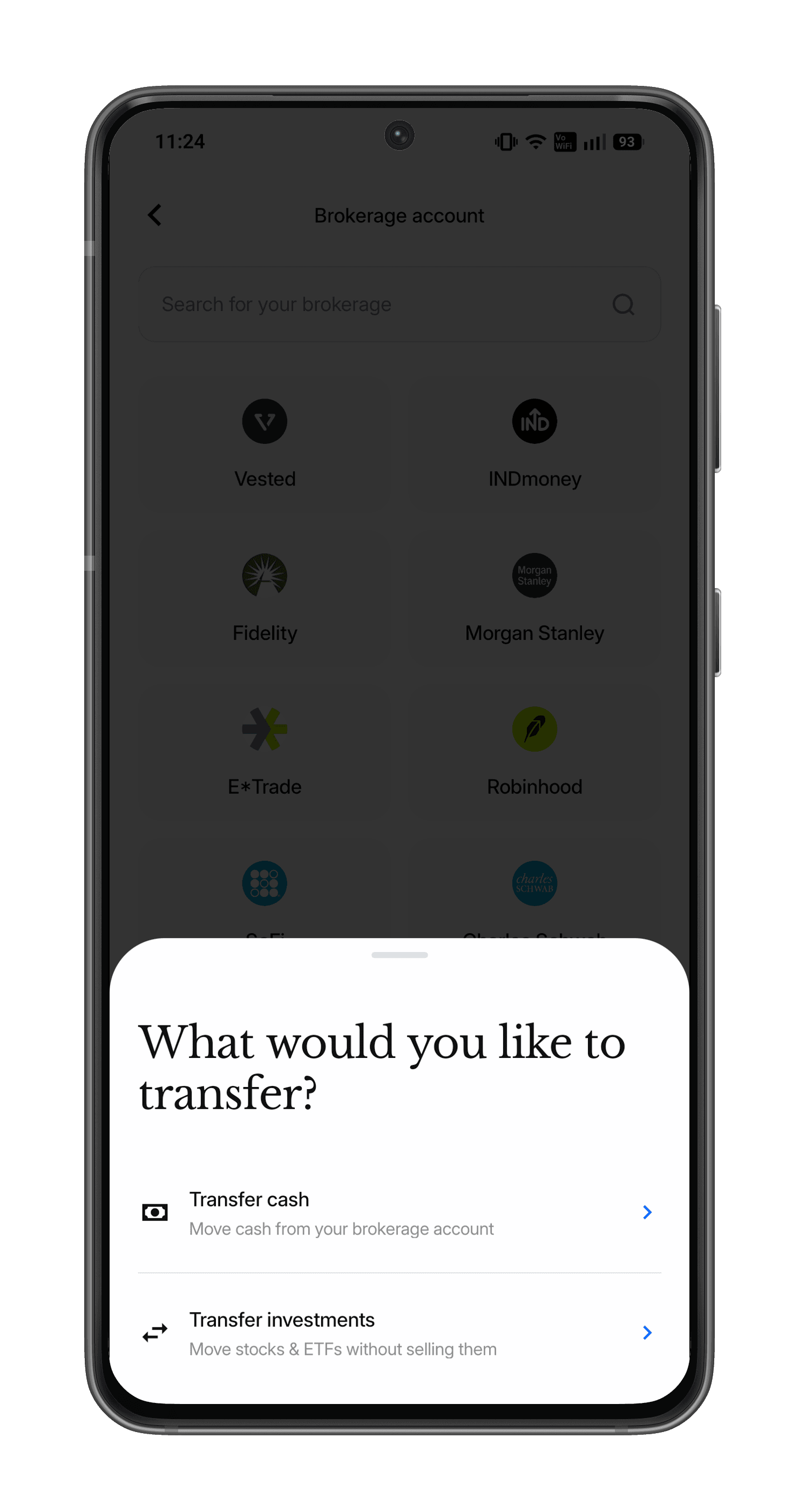
Step 4: Select your type of transfer
You can transfer investments without selling (from your brokerage account and also your employer RSU account) as well as any cash you have in your EquatePlus account.
Step 5: Follow the on-screen instructions
Follow the on-screen instructions to complete your transfer.
Step 6: Liquidation and Diversification
Once received, the shares will appear in your Paasa app.
You can then liquidate them directly through the Paasa app. Our platform handles the multi-currency aspect seamlessly, allowing you to reinvest the proceeds into global stocks, UCITS ETFs, or managed strategies.
Need Assistance?
If you'd like our team to walk you through the process or have any questions around tax or compliance, reach out at support@paasa.com.
About Paasa
Paasa is a global investing platform built specifically for Indian residents and returning NRIs. We provide direct access to markets across 11 countries, including the United States, United Kingdom, Switzerland, Hong Kong, Germany, France, Canada, Netherlands, Japan, and Singapore and support 9 global currencies.
- Seamless "In-Kind" Transfers (ACATS): You can move your entire US stock portfolio (from brokers like Robinhood, Schwab, Fidelity, E*TRADE, and more) directly to Paasa. This allows you to consolidate your assets in one place without triggering a tax event.
- The Compliance Advantage: Paasa provides the exact reports you need for your Indian tax returns and foreign asset disclosures, eliminating the need for manual calculations.
- Estate Tax Protection: Paasa offers access to Ireland-domiciled (UCITS) ETFs, allowing you to legally shield your long-term investments from the 40% US Estate Tax that applies to non-residents.
Frequently Asked Questions
Do I need to sell my shares on Equateplus before transferring?
No. You can transfer your vested shares directly to your Paasa account "in-kind," meaning you do not have to sell them first. This allows you to move the actual shares without triggering a sale event on the Equateplus side.
My RSUs are listed in Europe (or denominated in Euros/GBP). Can I still transfer them?
Yes. Paasa supports transfers irrespective of where the stock is listed (US, EU, etc.) or the currency it is denominated in (USD, GBP, EUR, etc.).
How do I get the necessary transfer details for Equateplus?
They are in the Paasa app. Tap "Transfer investments", select Equateplus as your broker and follow the on-screen instructions, which show the details you need to enter in your Equateplus portal. If you get stuck, email support@paasa.com.
What can I do with the shares once they reach Paasa?
Once the shares appear in your Paasa app, you can hold them, or liquidate (sell) them. You can then use the proceeds to diversify by investing in markets across 11 countries (including the US, UK, Japan, and Germany) or withdraw the funds to your bank account.
Can I withdraw the money to my Indian bank account?
Yes. After selling your shares on Paasa, you can withdraw the proceeds to any bank account in the world, provided the account is in your name.
Does Paasa help with tax reporting for these shares?
Yes. Unlike many global platforms, Paasa provides the exact reports you need for your Indian tax returns and foreign asset disclosures (Schedule FA), eliminating the need for manual calculations.


Invest in global markets from India

Discussion
Disclaimer
The information provided in this post is for general informational purposes only. It is not intended as professional advice or to replace consultation with qualified professionals. While we strive to ensure the accuracy and reliability of the information presented, we make no representations or warranties of any kind, express or implied, about the completeness, accuracy, reliability, suitability, or availability with respect to the content contained herein. Any reliance you place on such information is therefore strictly at your own risk. We disclaim any liability for any loss or damage, including, without limitation, indirect or consequential loss or damage, or any loss or damage whatsoever arising from loss of data or profits arising out of, or in connection with, the use of this post. Always seek the advice of professionals or relevant authorities regarding your specific situation or circumstances.